
Site planner
Explore a conceptual arrangement of lots and roads.
Site planner#
Explore a conceptual arrangement of lots and roads, then export the assumptions and results for review.
Access: Pro. Concepts are not surveys, engineering plans or entitlement approvals.
Sample site-plan report#
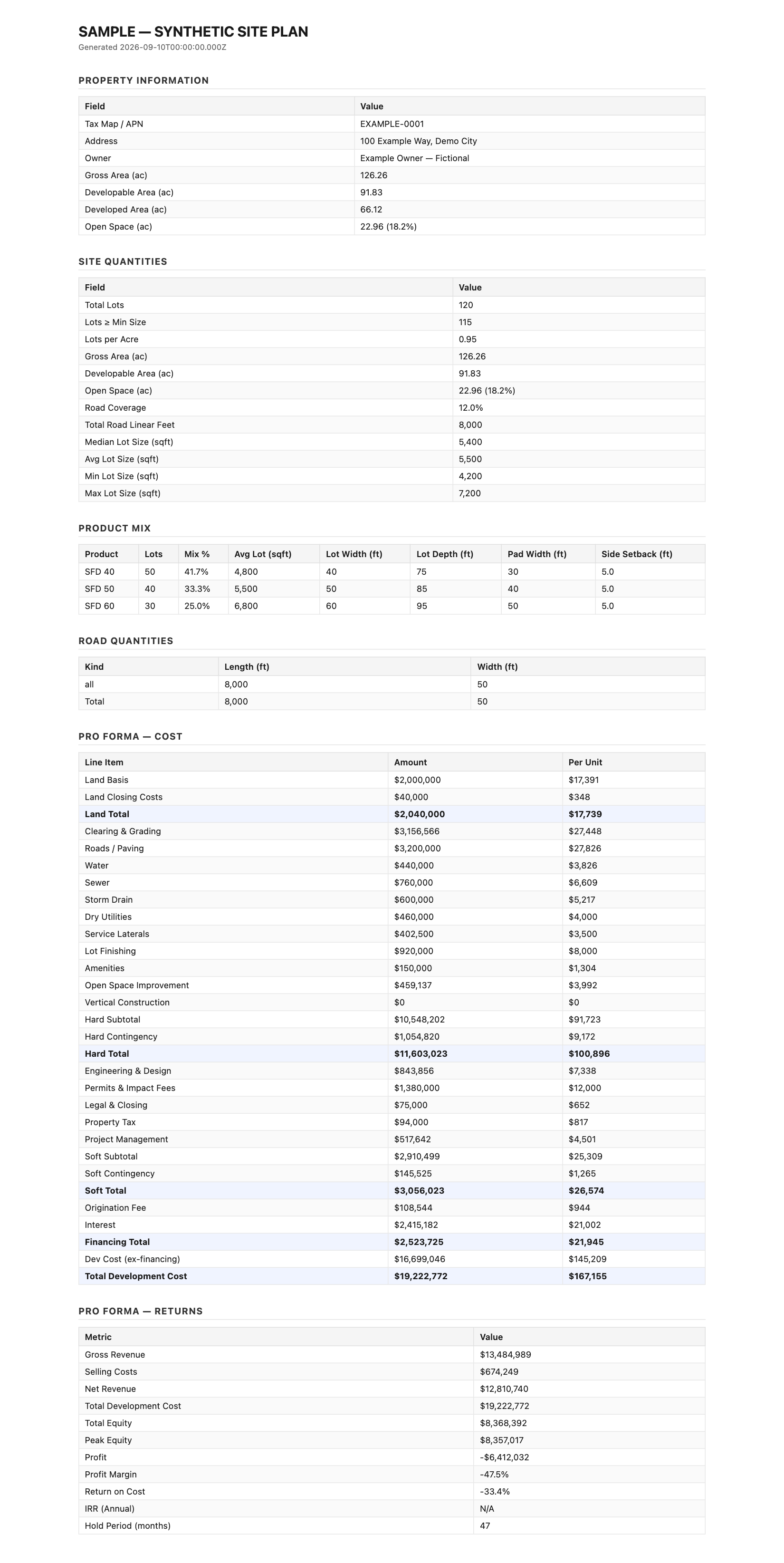
This is the actual Pillar report export, generated from fictional inputs adapted from the exporter’s test fixture. It shows lot mix, land allocation and financial assumptions. It is not a solved real parcel or a financial forecast.
Open the sample report · Download PDF · Download spreadsheet · Download CSV
The PDF is a browser-print copy of the actual HTML report. The HTML, CSV and spreadsheet use Pillar’s production exporters.
What you get#
Use a site boundary and planning inputs to explore a proposed layout. Review the resulting geometry, lot counts and output figures before comparing another scenario. The export keeps the assumptions alongside the results.
Try it in Pillar#
- Open the site planner for a parcel or boundary.
- Review the site inputs and planning assumptions.
- Generate a concept and inspect the lot and road layout.
- Export the report or spreadsheet to review the figures.
Plans and limits#
See Plans and limits for current Free, trial, Pro and Pro Annual allowances.