
Using the AI Agent
Ask the AI agent to research markets, find properties, and analyze sites.
Updated · June 2026
Using the AI Agent#
Pillar's AI agent can search parcels, find properties, pull GIS data, research markets on the web, and chain these tasks together — all from a conversational interface on the map.
Opening the agent#
Open Map. The agent is docked on the left side of the map, and the composer is also the main property search entry point. Type an address, owner, APN, or a plain-language search like "vacant land over 10 acres in Fulton County, GA" and press Enter.
For a form-based bulk search instead, click Bulk & saved searches (the sliders icon next to the composer), then choose County, City, Draw a Polygon, or a saved search.
What you can ask#
The agent combines three specialist capabilities:
Property search#
Ask the agent to find parcels matching specific criteria. It can search across 160M+ US parcels by location, acreage, zoning, owner type, use code, and more.
- "Find vacant land over 10 acres in Fulton County, GA"
- "Industrial parcels near rail lines in Houston"
- "Waterfront lots under $500k in Miami-Dade"
GIS and data layers#
The agent can discover and use GIS data layers as spatial filters — infrastructure, environmental boundaries, school districts, and more. It can also pull data from external ArcGIS servers.
- "Show me parcels within 2 miles of a substation in Travis County"
- "Find land outside the floodplain near I-85"
Layer-aware chat#
You can give the agent a specific map layer as context instead of describing it from memory.
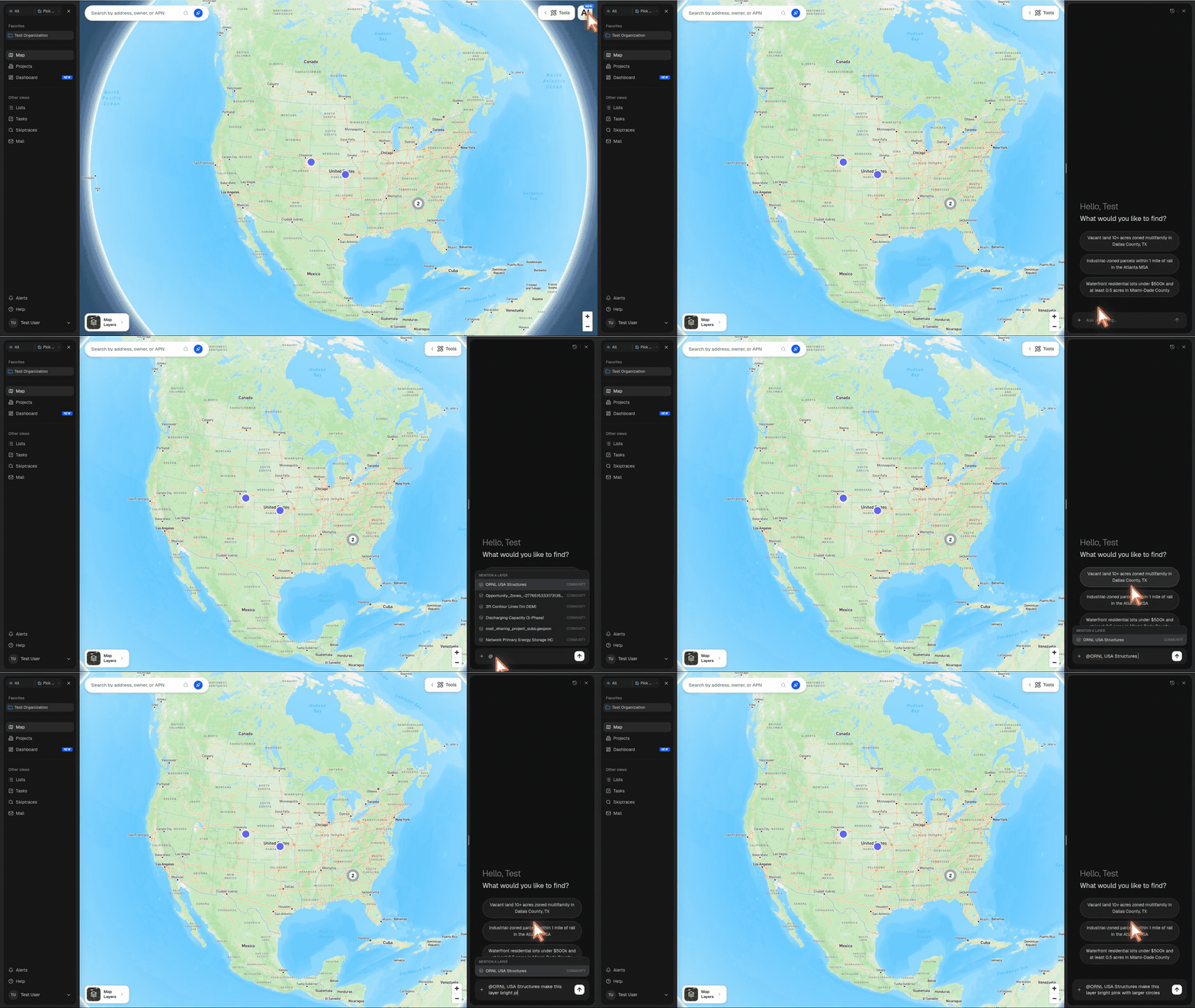
There are two ways to attach a layer to a message:
- Mention it inline — type
@in the chat composer, choose a layer from Mention a layer, then finish your prompt - Attach it from the menu — click Add attachment (
+), open Layers, search for the layer, and select it
Mentionable layers include community layers, Pillar layers, and your organization's visible completed uploads. Once attached, the agent receives the layer ID directly, so it can inspect the right layer instead of guessing from the display name.
Use this when you want the agent to analyze or restyle an existing layer:
- "For @ORNL USA Structures, make the points bright pink and larger"
- "Color @Discharging Capacity by available MW and add a legend"
- "Look at @Opportunity Zones and tell me which counties it covers"
For styling requests, the agent reads the layer metadata, picks real property names, and applies the style back to the layer in the Map view. The update appears live, is shared across your organization, and can still be changed later from the layer's Edit Style panel.
Web research#
The agent can search the web, read pages, and pull information from public sources — news, SEC filings, company sites, and more.
- "What's the recent development activity in downtown Nashville?"
- "Research the owner of this parcel"
Multi-step workflows#
The agent can chain these capabilities together. For example, it might download a GIS layer of transit routes, then use that geometry to find parcels within walking distance, then research the market conditions in that area.
How it works#
When you send a message, the agent evaluates whether your query is specific enough to execute immediately or needs clarification first.
Direct execution — if your query includes a clear location and concrete filters (e.g., "10+ acre parcels in Douglas County, CO"), the agent runs the search immediately.
Plan mode — if your query is broad or ambiguous (e.g., "datacenter sites near Atlanta"), the agent first presents a structured plan showing the proposed search area, filters, and spatial constraints. You can approve the plan or refine it before the search runs.
Working with results#
When the agent finds properties, a result card appears in the chat showing:
- Dataset name and feature count
- The search filters that were applied
- An eye toggle to show/hide the results on the map
From the result card, you can:
- View on map — toggle the results layer on to see parcels highlighted
- Edit style — customize how the results are displayed (colors, labels)
- Save to my layers — persist the results as a layer in your Layer Library
Results are temporary unless saved. Saving stores them as a permanent layer accessible from the Layers panel.
Chat features#
- Follow-up questions — continue the conversation to refine results or ask related questions
- Queue messages — type a follow-up while the agent is still working; it will be sent automatically when the current task completes
- Stop — click the stop button to cancel a running task
- Session history — access previous conversations from the menu (three dots in the header). Pin important chats for quick access.
- Multiple sessions — switch between active conversations using the tab bar
Suggestions to get started#
If you're not sure what to ask, the agent shows three starter prompts:
- "Datacenter sites near Atlanta"
- "Waterfront lots under $500k in Miami"
- "Industrial land near rail lines"
Click any of these to kick off a search, or type your own query.
Tips#
- Be specific about location — named counties, cities, or addresses work best
- Include quantitative filters when possible (acreage, price, distance)
- The agent works best for site selection queries — finding land, analyzing locations, and researching markets
- If the agent gets stuck, try rephrasing your question or breaking it into smaller steps