
Zoning data
County-by-county zoning access, map layers, and per-tier legend controls.
Updated · July 2026
Zoning data is the most requested filter in Pillar — and the hardest to get right, because zoning is set at the county (or municipal) level and every jurisdiction codes it differently.
How zoning works in Pillar#
Pillar partners with Zonomics to bring standardized zoning data for counties where it's available. Because this data is expensive to source and maintain, it's sold as a separate annual add-on, one county at a time.
That means:
- Zoning is not included in your base subscription by default.
- Each county is purchased separately, on an annual plan.
- Once a county is enabled, every member of your organization can use it.
To see what counties you currently have, head to Account → County zoning.
Buying a county#
From Account → County zoning, click Add a county. Search for the county you want, confirm the price, and check out. The data is available in your account within a few minutes.
Filtering by zoning#
Once a county is enabled, the Zoning filter in the filter bar shows the districts that county uses. Zoning categories are normalized into a common taxonomy so you can search across counties:
- Residential — single-family, multi-family, mixed density.
- Commercial — retail, office, services.
- Industrial — light, heavy, warehousing.
- Agricultural.
- Mixed-use.
- Special purpose — overlays, planned developments, etc.
You can also filter on the raw county code (R-1, B-2, PUD, etc.) if you need specificity.
Zoning as a layer#
Turn on the Zoning layer from the layers panel to see zoning districts rendered as colored fills across the map. This is useful for:
- Visually scanning for where residential zones sit relative to commercial corridors.
- Spotting zoning "islands" — a small pocket of one designation surrounded by another.
- Confirming which district a specific parcel falls into.
Click any zoned area to see the district name, description, and the allowed uses as published by the county.
Show or hide specific zoning tiers#
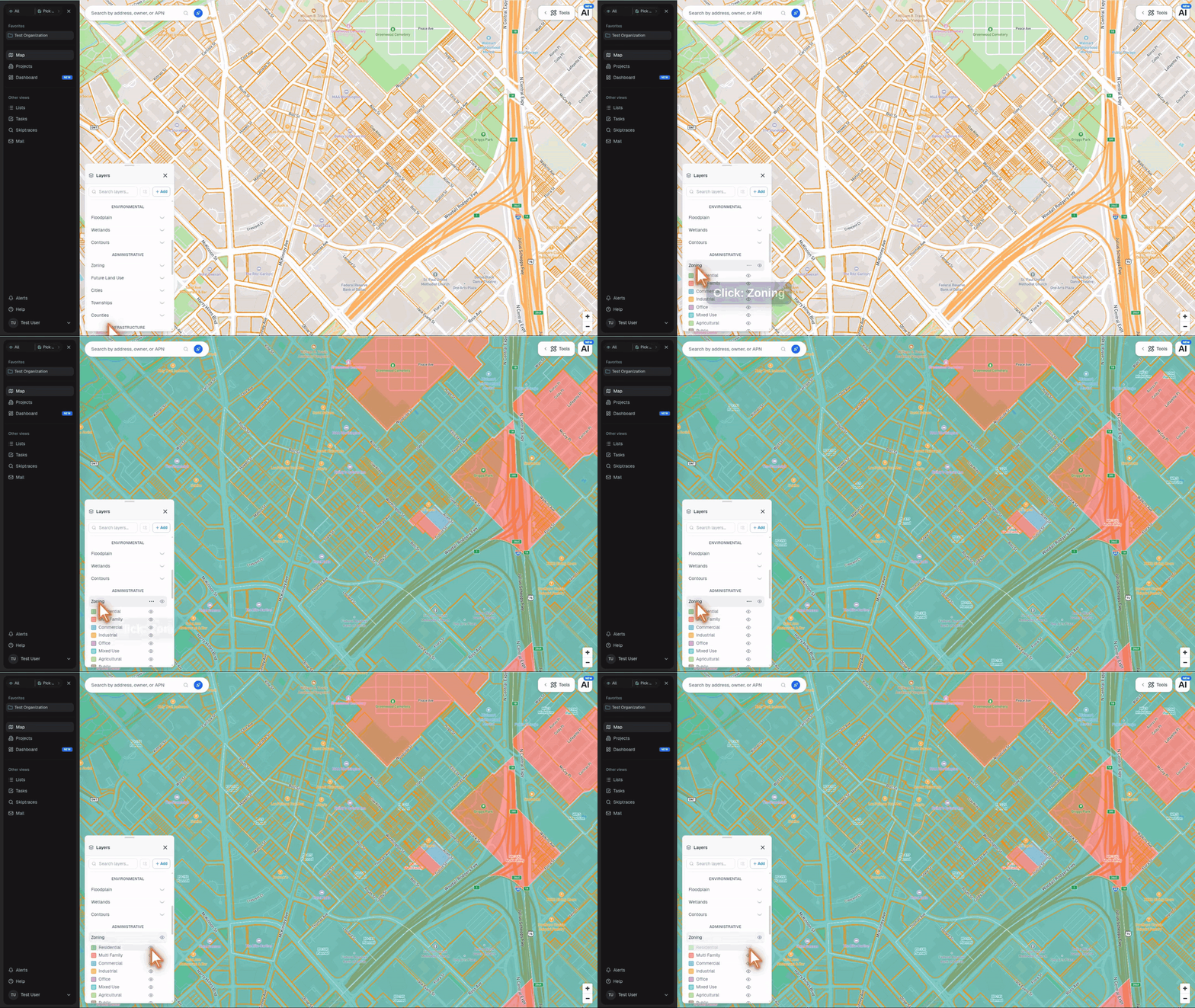
The Zoning layer includes a tiered legend. After you turn the layer on, the legend expands under Zoning in the layers panel with rows for each zoning tier, including Residential, Multi Family, Commercial, Industrial, Office, Mixed Use, Agricultural, Public, Transportation, Recreational, Special, and Other.
Click the eye icon next to any tier to hide that tier from the map. The row dims and switches to a closed-eye icon while that tier is hidden. Click it again to bring the tier back. Pillar remembers your hidden zoning tiers in that browser, so the same layer view is waiting after a refresh.
Future land use and General Plans#
Current zoning describes what a parcel can be used for today. A General Plan, comprehensive plan, or future land use map describes a jurisdiction's long-term policy direction; it does not by itself approve a rezoning.
On a paid plan, open Layers → Administrative → Future Land Use to see available plan designations. The overlay appears at zoom level 15 and above. Click a polygon to see its land use name, code, type, and category. Coverage varies by jurisdiction.
If the local plan is not available in the built-in overlay, ask the AI agent to find the official city or county General Plan or future land use GIS layer. For example:
Find and add the official General Plan / Future Land Use GIS layers for the cities in my search, then compare them with my saved parcels and current zoning.
The agent can pull machine-readable data from public ArcGIS services. You can also upload an official GIS file in GeoJSON, KML, KMZ, GeoPackage, or zipped Shapefile format.
Because plan designations differ by municipality and can be advisory, verify shortlisted sites with the jurisdiction before relying on them for acquisition or entitlement decisions.
What Pillar doesn't store#
A few things we intentionally don't surface, because they drift from ground truth too fast:
- Pending rezoning applications — check the county directly.
- Variance history — ditto.
- Overlay district nuance — we surface the primary district; if there's a historic overlay or planned-development conditions, assume there may be more to it than what's in Pillar.
For anything legally consequential, verify with the jurisdiction.